
Showing posts with label Jerome Holder. Show all posts
Showing posts with label Jerome Holder. Show all posts
Monday, 28 March 2011

Friday, 25 March 2011
Thursday, 24 March 2011
LiveType Skills
During editing workshops we were shown how to operate LiveType a programme that allows editors to create titles for your finished video clip. These are used for credits, or titles needed to establish things within video i.e. the "executive producer" or "actor names".
Above is a video tutorial I have created using QuickTime Player. I used QuickTime Player to record me constructing a title saying "AS Media Final Assessment" adjacent to my constructed tutorial is the end product which is a result of me exporting the LiveType file as a .mov file.
My tutorial above shows how to change font of titles, change colours and other attributes and how to add effects to already constructed titles, and how to export your finished product to your desktop.
Font analysis
We put a lot of thought when creating our titles. We wanted our titles to look serious but also casual.
we created our titles using the programme LiveType.


We decided to put the titles over the opening instead of on a blank screen, this is because we believe this looks more effective and also more professional. It also means we can make the screen busy making the audience that the movie has also action in it even tho it is a thriller.
we created our titles using the programme LiveType.
This is the font we used, we all decided it will suit our opening as it looks serious but still casual jus like we wanted it to look like.

Here is how the title appears on our opening.

Thriller Audiences - Research
2010 saw box office success for many thrillers. 27 films last year cracked the top 10 of worldwide box office outlets, proving that the demand for thriller films is still prominent, and that audiences are still packing in to cinemas to see the latest thrilling films.
Above are trailers for two of the years biggest success's - the thrillers "Shutter Island" and "The A-Team" which represent both the Psychological thriller denomination and the Action thriller denomination. "Shutter Island" released through Paramount pictures, was directed by prestigious director Martin Scorcese and starring Leonardo DiCaprio. Filmed with an $80 million budget, the film went on to gross over $800 million worldwide.
"Black Swan" starring Natalie Portman was another thriller released last year which saw an emphatic reception from audiences worldwide - the film went on to gather numerous Oscar nominations, with the films leading actress picking up her fest Best Actress Oscar. Further evidence that thrillers are in high demand and are able to garner both critical success and pack in audiences.
After researching into the genre, I have concluded that Thrillers are marketed to a more adult consumer, with the highest grossing thrillers, displayed above all carrying a British Film Council certificate of "15". Thrillers tend to have dramatic storyline's that examine the psychological aspects of human beings, and also examine the thrilling aspects of life also.
In 2009, UK Box Office intakes hit their highest since 2002. Surpassing the £1 Billion threshold, thrillers had one of the largest contributions to the record-breaking year.
Introduction to Editing - Skills
At the beginning of the year, we were given key classes to help us with our editing. Our teacher set up workshop sessions to make sure we had the best knowledge to begin our editing and create a substantial piece of work. Here are some key features and things we learnt back at the beginning of the term when we were introduced to editing using the editing software Final Cut Pro:

Above is a screen shot of the "Browser" in Final Cut Pro. This area of the programme is used to import all files into your edit, it also contains time codes that establish how long each clip of media lasts for. Using a simple "drag and drop" manouver from the "Browser" to the timeline.

This screen shot depicts the "Slug" and the "Canvas" these two regions of the programme are used in editing to help construct your timeline, or to show what is in your timeline. When video is inserted in these two regions a green tick will appear to identify good quality footage and couloured lines are used to identify the intensity of light in footage.


Above is a screen shot of the "Browser" in Final Cut Pro. This area of the programme is used to import all files into your edit, it also contains time codes that establish how long each clip of media lasts for. Using a simple "drag and drop" manouver from the "Browser" to the timeline.

This screen shot depicts the "Slug" and the "Canvas" these two regions of the programme are used in editing to help construct your timeline, or to show what is in your timeline. When video is inserted in these two regions a green tick will appear to identify good quality footage and couloured lines are used to identify the intensity of light in footage.

This screen shot shows the timeline where media clips are inserted - the timeline is designated into audio and video sections, by doing this it makes it much easier to establish for example how long you want a clip. When using Final Cut Pro, you are able to modify data to disassociate the audio recorded with the video, making the programme much more maleable and easier to control.

This screen shot shows the tool located next to the timeline, this tool allows you to manipulate various parts of your media with different tools, here is a breakdown:
Selection Tool: This is the main tool used to select and move media clips, the tool allows you to do the most and acts as the "arrow" during editing.
Edit Selection Tool: This tool makes editing much easier, it provides easier access to the "Slug" and "Canvas" functions in the programme, and makes changing transitions much easier.
Roll Tool: Is used when configuring transitions and effects when editing in Final Cut Pro.
Slip Tool: The Slip tool is used when trying to establish correlation between video and audio within its original source.
Razor Tool: Is an editing function used to trim down the length of your media clips in the timeline.
Zoom Tool: The zoom tool is used to increase the focus of your timeline.
Crop Tool: Is used to manipulate the size of video files in your timeline.
Pen Tool: This tool is used for manipulating sound levels during editing.
Audio Mixer: The Audio mixer measures the dB level of the audio in your timeline, when the mixer level peaks in the red, the sound is over the level it should be and becomes distorted.
Editing process
Here are the screen shots we took while editing.


We decided to start off with a split screen because it will match with the narration which we will put in about London having a good side but also a bad side, this also interacts with our two different characters and how the husband changes his persona from good to bad when he finds his wife dead.

This is our final product of our opening split screen, we will also add in the narration and the text.

We have some key shots that are paused and are in black and white, this is to show the audience that these are important shots. In the first key shot you can see that the husband character is in control attacking his wife's killer while he is tied up.
In the second key shot we see that the roles have changed. This time its the husband who is being hit by his wife's killer. These two shots also show that there is a element of surprise and that anything could happen.


Changes made from Rough Cut
We were very pleased with our rough cut, however we knew that it was not perfect and it needed some things added such as a sound track and titles, we also decided to add narration to make the audience understand the opening more and we just thought it added to the quality of the film. We did not change much from the rough cut besides adding a certificate at the beginning.
Inspiration - "Scary Shots"
During the earlier stages of planning our teacher Mary showed us various examples of thrillers, here are some examples of some typically thriller shots that inspired our work, these shots were used as stimuli for our final film.


Above is a screen shot from the film "jackie Brown" it stars Samuel L. Jackson and Robert De'Niro - specifically it was directed by Quentin Tarantino, a film director that definitely has inspired me as a film maker. Next to the screenshot of the "Jackie Brown" film is a screenshot from our AS Media submission "Lying With The Enemy" here you can see that we have interpreted the "below" camera angle from the film and put it in ours.


Here is a screen shot from 2005 motion picture release "Bomb The System" directed by Adam Bhala Lough. Here a split screen is used to show two things that are happening at the same time and are in correlation with each other, for our production, in the editing process I decided to interpret it and use this idea for the London-based establishment shots. This fits in with the "London has two sides" theme of our narration.


Above is a screen shot from Guy Ritchie's 2000 film "Snatch" in this film the editor uses a screen shot to introduce a character, which is an important addition to the film. For our edit we used a screen shot to highlight a key moment in the film and focus on a specific part of our narration.


Above is a screen shot from the film "jackie Brown" it stars Samuel L. Jackson and Robert De'Niro - specifically it was directed by Quentin Tarantino, a film director that definitely has inspired me as a film maker. Next to the screenshot of the "Jackie Brown" film is a screenshot from our AS Media submission "Lying With The Enemy" here you can see that we have interpreted the "below" camera angle from the film and put it in ours.


Here is a screen shot from 2005 motion picture release "Bomb The System" directed by Adam Bhala Lough. Here a split screen is used to show two things that are happening at the same time and are in correlation with each other, for our production, in the editing process I decided to interpret it and use this idea for the London-based establishment shots. This fits in with the "London has two sides" theme of our narration.


Above is a screen shot from Guy Ritchie's 2000 film "Snatch" in this film the editor uses a screen shot to introduce a character, which is an important addition to the film. For our edit we used a screen shot to highlight a key moment in the film and focus on a specific part of our narration.
Editing process
British Board Of Film Classification certificate

We wanted to make the beginning pf the movie as authentic as possible so we decided to add a British Board Of Film Classification certificate. We decidid that the minimum age you would have to be to watch the movie will be 15, this is because their is a murder scene and the story is too strong for a under 15 year old to watch.

Planning of Location
When deciding on where to film, we thought about what scenes we had, and we knew that we had a scene where the husband had an average day at work and he notices the murderer from across the street. So we decided to film in Canary Wharf, because it is a high end business place where a respectable person would work. Canary Wharf is a place with very high security and they do not like people filing their as it is a security risk and high terrorist alert. Therefore we got permission to film before hand, we spoke to the police officer, officer CW 251 and he gave us the go ahead to film all around Canary Wharf after he checked if we were genuinely A Level media students on his walkie talkie talking to someone on the other end. After this we found a sign saying canary wharf on it and decided to film there so when the it is watched the audience know where it is set. 


Wednesday, 23 March 2011
Costumes
When planning our thriller film we had to put a lot of thought into our costumes, as our movie is set over a number of days. It meant that we wasn't always going to be wearing the same thing, because what person wears the same thing 5days in a row? Therefore we decided upon different casual outfits to wear on different scenes, we went for the more casual look but while wearing alot of black to connote that he was a criminal and that he was a sinister person.
The Canary Wharf scene
This scene was our most well prepared and thought out part of our costume design, we put alot of effort into making this work and believe we succeeded.
The Murderer


The Husband

We chose these two outfits to show that the murderer was a bad person, so by dressing him in all black it would show he has bad intentions and is up to no good. Also the husband was dressed in a suit to show it was a average day at work for him and that he was a respectful upstanding citizen that did not deserve the bad fortune of having his wife murdered. This is a character that our target audience could relate to, as we would want to do the same as him in his position.
Tuesday, 22 March 2011


Thursday, 17 March 2011
photos taken during filming
photos taking during filming

This is the photo which we took of Asilhan and Rebecca to show that they are a couple in the movie, this photo is placed in their home.

This photo is of Rebecca in the bed scene.

Jerome explaining his thoughts to how to improve the shot.

Asilhan and Jerome talking to each other about how the blood (diluted ketchup) should be used.

Jerome applying the diluted ketchup to the scene.
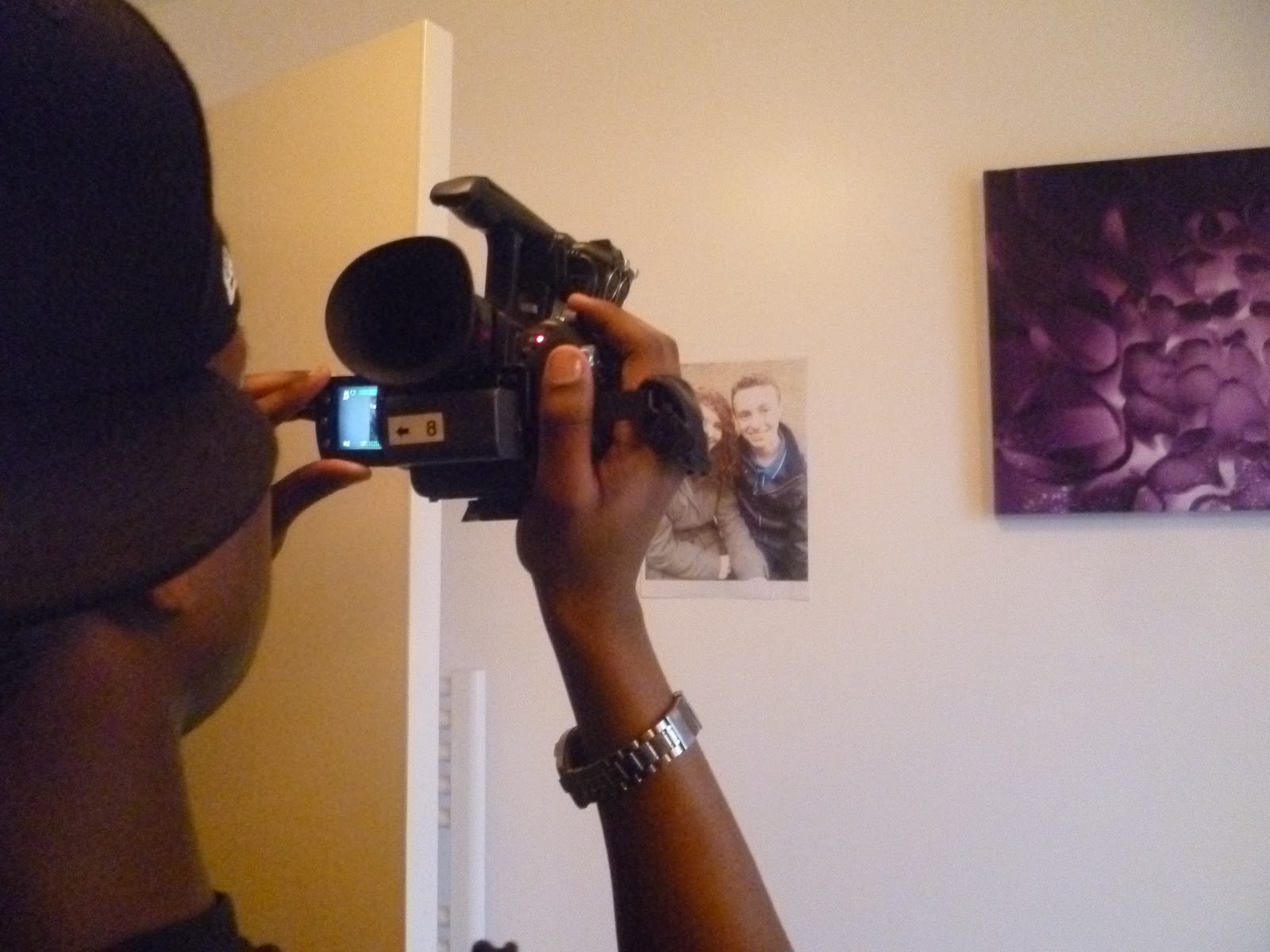
A shot of Jerome focusing on the photo of Asilhan and Rebecca.

Warehouse scene of Jem tied up and Abdul explaining his view.
3 analysed scenes in detail
I have watched the movie Phone booth which is a psychological thriller staring Colin Farrell. I have analysed 3 scenes that I believe creates suspense.
Scene 1
As Stew (Colin Farrell) is on the phone to a mysterious man, he also is on the phone to his wife; he ends the call with his wife as two “hookers” are annoying him by slamming on the phone booth wanting to get in to use the phone. We suddenly see a little toy robots roughly around 5-8 metres away from the booth, in the next shot the toy is only a few centre metres away. Also the mysterious man on the phone scares Stew by cocking his rifle, the tempo of the background music suddenly picks up pace. As the mysterious man counts down from 3 we expect him to shoot Stew but instead the little toy robot that was just outside the booth blows up. The music stops straight away.

Scene 2
Stew still on the phone to the mysterious man gets a signal from the police officer there that they have located the mysterious man who has a rifle, as Stew tell the mysterious man that they found him the tempo of the background music speeds up, also the mysterious man’s speech speeds up too. We cut to a quick shot of armed officers going up some stairs to get the mysterious man. The mysterious man threatens to kill Stew’s wife but Stew runs out of the phone booth saying “take me” we cut to many different close up shots of random windows from many different buildings. Suddenly we hear gun shots, Stew drops to the floor but there is no blood as he was shot by a double bullet.

Scene 3
In one of the last few scenes of the movie we see Stew now in the back of an ambulance car just being given an injection to help him feel better. Because of the injection Stew was given his vision gets blurry, he looks around seeing an arm, he looks up hearing the mysterious man’s voice, we don’t see the man’s face until he walks away and the camera follows him. There is then a few seconds of narration saying “Isn’t it funny you hear a phone ring and it could be anybody, but a ringing phone has to be answered doesn’t it, doesn’t it” we then hear sound effects of a ringing phone and digital sounds when suddenly, 3 seconds of silence with the audience not knowing what is going to happen when a unexpectedly a new person says “hello” which tells us that the mysterious man will be doing the same thing to another person as he just did to Stew.
Scene 1
As Stew (Colin Farrell) is on the phone to a mysterious man, he also is on the phone to his wife; he ends the call with his wife as two “hookers” are annoying him by slamming on the phone booth wanting to get in to use the phone. We suddenly see a little toy robots roughly around 5-8 metres away from the booth, in the next shot the toy is only a few centre metres away. Also the mysterious man on the phone scares Stew by cocking his rifle, the tempo of the background music suddenly picks up pace. As the mysterious man counts down from 3 we expect him to shoot Stew but instead the little toy robot that was just outside the booth blows up. The music stops straight away.
Scene 2
Stew still on the phone to the mysterious man gets a signal from the police officer there that they have located the mysterious man who has a rifle, as Stew tell the mysterious man that they found him the tempo of the background music speeds up, also the mysterious man’s speech speeds up too. We cut to a quick shot of armed officers going up some stairs to get the mysterious man. The mysterious man threatens to kill Stew’s wife but Stew runs out of the phone booth saying “take me” we cut to many different close up shots of random windows from many different buildings. Suddenly we hear gun shots, Stew drops to the floor but there is no blood as he was shot by a double bullet.
Scene 3
In one of the last few scenes of the movie we see Stew now in the back of an ambulance car just being given an injection to help him feel better. Because of the injection Stew was given his vision gets blurry, he looks around seeing an arm, he looks up hearing the mysterious man’s voice, we don’t see the man’s face until he walks away and the camera follows him. There is then a few seconds of narration saying “Isn’t it funny you hear a phone ring and it could be anybody, but a ringing phone has to be answered doesn’t it, doesn’t it” we then hear sound effects of a ringing phone and digital sounds when suddenly, 3 seconds of silence with the audience not knowing what is going to happen when a unexpectedly a new person says “hello” which tells us that the mysterious man will be doing the same thing to another person as he just did to Stew.
Monday, 14 March 2011
Arlington road
This scene from arlington road inspired us to make our opening, with the first person shots and the flash backs of what happened. We incorporated similar scenes into our movie.
STORYBOARD
Here is our first storyboard, we might make some changes during filming if we thing the changes will have a positive impact on our opening


Subscribe to:
Posts (Atom)